The Hidden Quirks of Garmin: Why Doesn’t My Garmin Venu Track Swimming Records?
I’ve owned a Venu 3 for almost three years now, but Garmin never stops surprising me.
Over the past year, I started visiting the swimming pool much more frequently. Because of that, I happened to notice that the “Pool Swimming” tab on my Garmin Connect Personal Records page was completely empty. I have personal records for walking, but none for swimming.
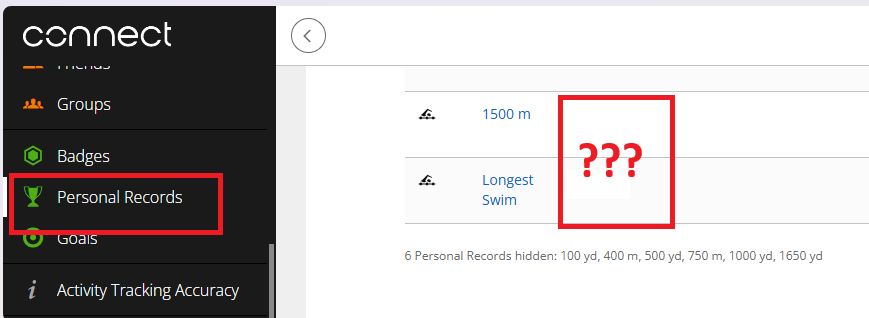
At first, I thought it was just a bug. I also know that Garmin’s default solution for almost any technical issue is resetting the watch. I didn’t want to reset my watch and reconfigure all my settings from scratch, so I just ignored it – it wasn’t a huge deal.
But my wife recently showed me that her Galaxy Watch congratulated her on her longest swim ever (more about Galaxy Watch and swimming). This made me want to check my own longest distance. I also wanted to look at my best 100-meter and 1000-meter times. So, I decided to finally find out why Garmin Connect wasn’t calculating these basic metrics for me.
And I found the answer ! As is often the case with Garmin, it comes down to crazy product fragmentation – this time at a micro or even nano level. As it turns out (if you know what exactly to search for – you find the answer), the Garmin Venu 3, which supports pool swimming pretty well (read more here “Garmin Venu 3: Track Swimming in a Swimming Pool“), does not support personal records for swimming.
After learning that, I suppose I should just feel lucky my watch supports the “mega feature” of step count personal records – the highest number of steps taken in a single day. Garmin easily could have made that an exclusive tier feature as well!
Actually, calculating the longest swim or any other record doesn’t require special hardware or on-device processing at all. All the data stored in Garmin Connect is already more than enough to determine those metrics automatically. For instance, to find your longest swim, all the app needs to do is take your swim activities and sort them by distance (I did exactly that to find to add my record manually). To find your fastest 100 meters, it just needs to compare 4-lap time blocks (for a standard 25m pool) across your workouts and identify the shortest one. While doing that manually is a lot of work, doing it programmatically is completely trivial.
Some might say, “You should do your research before spending your money.” I swear I did! But I simply didn’t have enough imagination to guess which basic software functions, Garmin would lock behind random distribution across their lineup.
Speaking of random distribution: according to Garmin’s support article mentioned above, swimming personal records are supported on watches like:
- Enduro (starting from the original in 2021)
- Fenix (starting from the Fenix 5 in 2017)
- Forerunner (starting from the FR 55 in 2021)
- Instinct (starting from Instinct 2 in 2022)
- Venu 4 (2026)
For context, the Venu 3 was announced in 2023 – six years after the Fenix 5, two years after the Forerunner 55, and a year after the Instinct 2.
For a while, I thought upgrading to a Fenix model was the only safe bet if you wanted to avoid finding missing features here and there. But even that isn’t entirely true: the flagship Fenix series (including Fenix 8 and 9) lacks walk auto-detection, a feature that the Venu 3 and Venu 4 have. This means, that the new unified platform, reduces the issue (hopefully) but does not solve it completely.
Nevertheless, I still believe choosing a Fenix is the best way to minimize the risk of discovering missing features you never could have imagined were treated as premium add-ons in the first place.