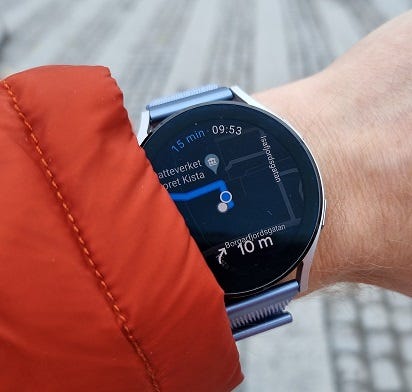
Disable Samsung Health Steps Counting on a Phone
Samsung Health is a rather advanced app that supports scenarios most people do not think about. For example, if you have several fitness wearables connected to your phone. Like a Galaxy Watch and a band.
Note: if you need to disable step counting on a Garmin Watch – check this article.
It also tries to be smart and combines steps counted by the Samsung Health on your phone with steps, counted by your watch. For people who wear smartwatches 24/7 this is probably an overkill. But for other groups of users, this could be useful.
Usually this just works, and most of us do not even notice that the Samsung Health counts steps on both, on the watch and on the phone.
So, you can make sure that you walk enough steps per day. By the way, “10000” is not an accurate daily steps goal from the health point of view — check “How many steps per day do you really need?” article if you are interested in the goal, which is backed by a research.
However, sometimes multi-device step counting does not work well. I saw two types of reports:
- The number of steps is doubled (data from different sources is added, instead of being properly merged).
- Samsung Health drains a noticeable amount of battery on some phones (bad implementation of step counting on hardware, drivers level?)
To mitigate these problems, one can disable step counting in the Samsung Health phone app. Below is a step-by-step instruction on how to do this:
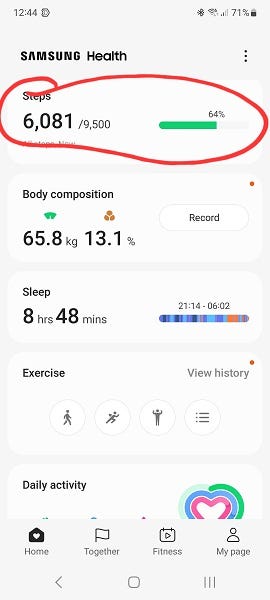
Step 1: tap on the “Steps” block to get into the detailed steps screen:
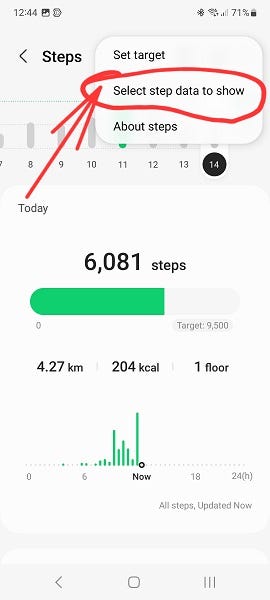
Step #2: Select “…” menu (right upper corner) and tap on “select steps data to show”
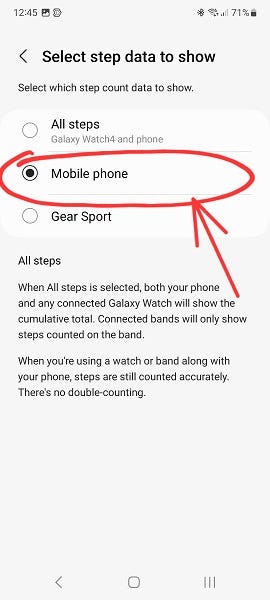
Step #3: Select “mobile phone” to show steps counted by the phone itself only
Step #4: Now “…” menu will contain an option to pause steps counting (on the phone) – do this.
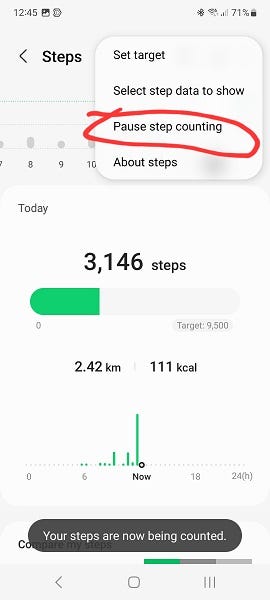
Step #5: Now configure the app to show all steps again.
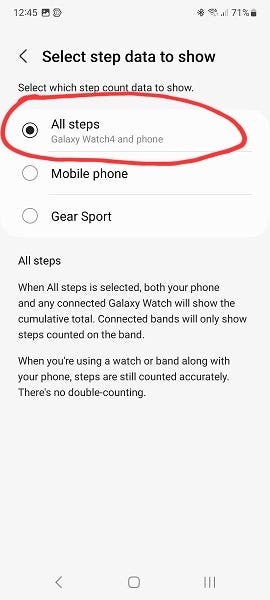
Done! In reality, this is not as complicated as it could like 🙂
Since step counting on your phone is paused, “all steps” is literary equal to steps counted by your watch.
PS:
If you’re considering purchasing the Galaxy Watch, Galaxy Watch Classic, Galaxy Watch Ultra (or anything else) from Amazon, consider using my partner links below – costs nothing extra for you but can help me to pay for the hosting. Moreover, besides the new model announcement deals, Amazon usually offers better prices than the Samsung webshop. Thank you in advance!
Links: